How can we still say no to tech in classrooms?

This article is adapted from one written by shaubo, a high school principal in Stony Plain, Alberta, Canada.

Why aren’t all teachers embracing technology?  Why are some jumping in with both feet, some paddling around in the kiddie pool, and some well back of the water?

Come on in! The water's fine!

Is it stubborness? Fear? Intimidation? Perhaps – but it could also be a genuine concern that the embedded use of technolgy doesn’t change anything about the material they are addressing.

Some teachers question why it may be more beneficial to students to use GoogleDocs to write an essay than it is to do it on a word processor at home and submit it?  Why is doing an online slideshow on a project more relevant than a paper poster? How does making a video change what is learned?

Here are my thoughts on why the use of technology and social media is often limited, and why it’s use in the classroom is essential:

1.  I’m concerned many teachers don’t see the true importance of collaboration.  Simply put, collaboration is an essential 21st Century skill; and cannot be limited to the classroom during a set time period.  Using online tools to collaborate and create allows students to combine their best thoughts and ideas, regardless of the time of day or where they are – ultimately creating a deeper learning experience.  I’m reading ‘The Global Achievement Gap” by  Tony Wagner  in which he discusses how corporations and academia are relying on their employees to be strong collaborators and creative, critical thinkers – not just with their colleagues down the hall, but with ones around the world. Learning is a collaborative effort and making peer-editting and/or authentic discussions a part of the assignment increases this skill.

2.  Most teachers are auditory or text-based learners.  This has a lot to do with why we have excelled in school.  Unfortunately students today are visual or visual-kinesthetic learners, and this has developed because of digital bombardment.  We see images as a complement to the text we read. Digital learners see text as a complement to the images they see.  I’ve heard a few teachers use this information as an argument for the need to teach todays learners about the importance of text, and I’ll admit, I believe there is some merit in that idea.  I ask myself however, why would we not modify our style to one that best fits the learner and the world?  If most people under the age of 25 are digital learners, why do we continue to prepare them to learn in a way that most likely will have little to no use within the next generation?  We have no problem altering the way we teach to reach students who need coloured paper to increase their comprehension levels.   We all have strategies to deal with students who have ADD or any other number of learning disabilities.  We differentiate our instruction.  It’s now time for us to develop strategies for our digital learners.  For a thorough and detailed discussion on this, see Ian Jukes’ work.

3.  I believe many educators do not recognize that, rather than schools being at risk of failing our students, we are at risk of becoming obsolete or at the very least, irrelevant to our students.  We force them to reference textbooks that are out-of-date before they are published.  We don’t allow them to use their personal devices in class.  We make them come to us for the information they could just as easily get online, and in a manner perhaps better suited to their learning style.  This worked for us.  We assume it will work for today’s students.  Unfortunately for most, it does not. We must develop our curricula and teaching to a standard that connects with today’s students and is relevant in the world.

4. Although we understand the importance of creativity and critical thinking skills, many teachers believe that these either cannot be taught, or if they can, simply evolve over the years of study.  I believe we can teach students to be creative – often by simply giving them authentic tasks and asking them to solve them, with our support, but without prescriptive guidelines.  Critical thinking comes from asking students to research, weigh the evidence, and make an informed decision that they can defend to the teacher and to their peers.  Think about how many online and social media techniques there are that can support this type of learning.  Take the online experience away, and we severely limit the scope of learning.

Is this just a problem only teachers face? Yes and no. Teachers I know believe they are doing a good job, and they’re right.  Students are engaged, test results are good, graduation rates are high.  Why do they need to change?  Because students are often failing to exhibit deep learning about the subject.  Technology opens up doors for them to ask questions teachers may not know about, to extend their learning, to find an area (perhaps even outside the prescribed curricula) in which they have a true interest.  The default is to limit ourselves to what can easily be measured by the standardized tests.   What we as teachers need to embrace however, is that this deeper learning will in turn support continued (and perhaps increased) success on assessements, regardless of their format.  Why would we not want to enable students to achieve the deepest learning and interest possible?  It’s about more than preparing them for the test – it’s about preparing them for their future the best way we can – we don’t know what that future will look like, but I’m pretty sure we know what it will NOT look like – like today’s classroom.

So, as educational leaders, how do we help to change this?  I believe it starts with supporting and encouraging teachers to step outside of their comfort zone.  This must become an expectation of teaching.  Teachers expect their students to do this every day.  It’s time we expected it of ourselves – both as teachers and administrators.

  • Administrators need to model online and digital teaching/learning techniques in our interactions with teachers – our staff meetings must include digital learning and sharing of successes. And yes, that means we have to learn it!

  • We must make the effective use of technology something we look for and provide feedback on when we do supervision and evaluation. It’s no longer good enough that they use an interactive whiteboard or post homework online.  We need to look for teaching that uses technology in a way that deepens learning.

  • We must insist on collaboration among teachers in this area – and insist this collaboration not be limited to the school or the school division, but a PLN that stretches to a global level.

As principals and leaders, are we ready to do that?  If you want to lead a school or a school division, you need to be.  As I met and discussed this issue with a number of delegates at a conference I was recently at, it donned on me why this may be more difficult than I originally hoped.  This was a national conference for educational leaders, and the majority of delegates were significantly behind in adoption of technological supports in education.   As George Couros discusses in a recent blog post  to push the teachers, we must first push ourselves.

I’m not asking everyone to dive into the deep end right now.  I do however insist you get off the deck chair and at least paddle around the kiddie pool.  Just like every little kid who watches the other swimmers, I think we’ll learn we want to be in the diving tank sooner than later.


You Can Do This!

Girl_computer_success_good_news_winYou Can Do This!

By Zach Clark

A recent post by Barrett Mosbacker entitled, “I Just Returned From the Future” has certainly sparked some dialogue among those we’ve shared it with. Responses have ranged from frustration and despair to enthusiastic choruses of “let’s do this!”

The post certainly challenged my own thinking and I thought I would share my notes after praying and thinking about this issue of leading our Christian school leaders and teachers to understand where all this may be headed for our students.

1. It is true that great teaching isn't defined by technology.

But, teaching (great or otherwise) that fails to help students demonstrate subject mastery using contemporary technology tools will produce students who lack the skills to integrate their knowledge and wisdom into contemporary mediums. Are we successful if we graduate students who can think deeply and critically, who are well written problem-solvers but don’t have a clue how to utilize contemporary tools in relation to others?

The basics of great learning and the utilization of contemporary tools and mediums are not divorced. But, for some reason we school folks treat them like they are.

We would never teach the principles of great writing and then have students get out a stone tablet and chisel. But, nowadays, we have students still print out their papers for peer editing and teacher editing. There are few excellent companies in America today that would utilize that approach to collaborative editing and final editing. The lack of productivity would be unacceptable. We must be focused on growing top tier teachers who understand that their jobs now utilize different tools today because students will be utilizing different tools in their future.

2. Dear reader, don’t get frustrated with me, but I still hear too much talk about teaching PowerPoint, Word, Excel, video editing, and other so-called technology skills.

We should be talking instead about expecting students to communicate visually, with integrated communications tools. We should be helping students use contemporary technology to unleash the power of groups in projects, collaborate over long-distances, and dialogue with peers across the hall or across the globe. My face flushed hot with embarrassment for a teacher in a high school classroom I visited in another Christian school this week to see that students had been producing fourth grade elementary-style crafts projects to demonstrate their knowledge of biblical integration concepts. Unbelievable! Unacceptable! I know I’m not as good an educator as you, but I’ll take bets on how much better some teams from your local businesses could help students actually learn to utilize today’s technologies in how they work together, communicate, and demonstrate mastery.

When I think about the skills that some Christian school educators believe are “technology skills” I shudder. Students, get out your three-ring binder notebooks! Let’s not use Evernote or OneNote. Students write in your planners! Don’t use your iPhone calendar or Google calendars. Students take this essay question home and write me your answer! Don’t text me your answer. Don’t email me your answer. Don’t post your answer. Students, please turn in your drafts! Don’t upload them for my comments and edits. Students, please help me pass out the thirty copies I printed this morning of our sheets! Don’t ask me to post in online and review it with you on the projector screen, so you can access it from home later. Students, please add to the class discussion! Don’t upload an audio comment on what you actually think. We are dealing with a generation of teachers/leaders who think that technology is a “thing” an “add-on” rather than a change in the tools we use to actually live and work.

3. If educators keep talking to other educators about what education-technology is supposed to be, they are going to stay behind the curve.

We’ll never get there. Planning for curriculum integration of technology needs to include people [parents?] who have jobs that actually depend on their mastery of technology. I once sat in the audience while a leading curriculum and technology integration expert shared his brilliant content and wisdom. His ideas and thinking were impressive, but his personal use of technology was antiquated, unorganized, lacking mastery, and most educators wouldn’t even notice because it’s so far beyond them. He sure didn’t notice. He won’t be invited to speak at Apple, Inc. headquarters anytime soon.

What’s that ancient quote? “In the kingdom of the blind, the one-eyed man is king.”

We are talking to the wrong people. We need to keep throwing our passion and energies behind teachers who are hungry to learn about this. We are on the right track by supporting those passionate teachers who really are pushing this direction, but we need to expose them to people in our community who know how to make technology hum. We need to build strategic partnerships that support our teachers’ learning and stop expecting them to just learn from other teachers.

4. Our leaders and teachers should be modeling this.

This shouldn’t be a suggestion, but an expectation. The more we shy away from pushing this expectation, the more we perpetuate the reality that schools are one of the few places that don’t have to utilize technology effectively. Twitter and social networking are being grappled with in any industry. Also, one of the unique challenges we have is that although we do have teachers who are “early adopters” of technology, these folks aren’t always the best teachers of others because it comes so easy for them. They scare people.

A leader or teacher who struggles and conquers technology challenges is a far more effective example and teacher to other teachers. I once heard Mark Miller, Vice President for Leadership Training and Development at Chick-fil-A tell a story about Dan Cathy, their CEO building his own website back when the web was exploding. Couldn’t Mr. Cathy have easily hired someone to do that for him? Of course, but, he wanted to struggle, conquer, so he could be the example to those that would struggle after him.

5. Video technology is key, especially for leaders.

Video is such a key part of where the web is now and where it is going. Almost every teacher and certainly every leader should be pushing the envelope on this. I know many leaders are camera shy. Get over it. Push through it, work at it, practice it, keep doing it until you get better. A video message from a principal or head of school will go farther than any email ever could. If we want to personally engage today’s culture, video is a great way to do it. Our FIRST question, anytime anybody wants to communicate anything should be, “should we use video?” The answer will not always be yes, but it should be our very first communication question.

6. A practical suggestion: every teacher and leader should select a student mentor.

Each teacher and leader should seek out a student who is exceptionally gifted at some aspect of technology: web tech, mobile tech, video tech, social networking, or other and ask the student to mentor the teacher/leader on how to develop mastery of these tools. They should schedule a one to one visit with a student, at least twice a month, just to talk with the student about how they are using technology. I dare you to do this.

Here are a few questions for leaders and teachers to ponder and discuss.

Is this important? If so, please show each other your calendar so we can see how this is actually reflected in how you use your time.

How much time have you invested in the past week, month, year, decade in learning and mastering new technology?

Who are you learning from? Who challenges you on this?

I Just Returned from the Future

clip_image001

By Dr. Barrett Mosbacker

I just returned from the future.

In one of the strangest experiences I have had in a while, I lived the future as I read about it! I did not realize it for a while but then it struck me suddenly over dinner—”I am what I’m reading!”

Let me explain.

As I write this I am nearing the end of my annual Think Week (you can read details about Think Week in these two articles: How to Reduce Stress While Getting More Done; and in How To Find Time to Focus, Think, and Work). During my Think Week my primary focus is prayer and reading. On this trip I took several books with me including Humility (Andrew Murray), The Culture Code (Clotaire Rapaille), Think: The Life of the Mind and the Love of God (John Piper), Derailed(Tim Irwin), Death by Meeting (Patrick Lencioni), and Generous Justice (Tim Keller).

I also took Anywhere: How Global Connectivity is Revolutionizing the Way We Do Business (Emily Nagle Green). This is the book I was reading when I realized that I was living the future. I will summarize some of the key points of this book and their implications for our schools in a subsequent post but for now let me simply state the theme of the book;

Within the next ten years the global ubiquitous digital network will connect most of the world’s people, places, information, and things, which will fundamentally alter the way we live, work, teach, and learn.

The author, Emily Green, knows what she is talking about. She is the President and CEO of the Yankee Group—one of the world’s premier research firms on the impact of the global connectivity revolution with operations in North America, Europe, the Middle East, Africa, Latin America and Asia-Pacific.

One of the most fascinating parts of the book is her description of five consumer segments: Analogs, Technophytes, Digital Shut-ins, Outlet Jockeys, and Actualized Anywheres (AA’s). As I was enjoying my dinner and reading it suddenly dawned on me just how much I was exhibiting the characteristics of the Actualized Anywheres. The short description of AA’s is that they “bring the concept of a ubiquitously connected consumer to life.” This is when it struck me—-I was literally living the future she was describing!

Here is how I know. I wrote down how I was handling my recreational and work related tasks during Think Week. Here is a short list.

  • All of my books, newspapers, and magazines are on my iPad. I read, highlight, annotate, and share my reading content electronically.

  • I downloaded a book immediately onto my iPad based on a recommendation from the book I was reading at the time.

  • I held a video-call with my daughter and grand daughter using FaceTime on my iPhone.

  • I sent an email through Facebook to some friends and family. I accepted a connection request with a professional colleague on LinkedIn.

  • I used the Yelp application on my iPhone to find restaurants and read reviews before choosing a place to have dinner. I also wrote my own review on Yelp for the benefit of others.

  • I used my Garmin GPS to guide me to the restaurant.

  • While driving and while dinning, I used an iPhone application called SoundHound to identify and order songs to download. I liked the songs but could not remember the titles. SoundHound solved that problem.

  • I used an application called NoteSelf on my iPad to take notes using a stylus, including notes for this blog article. No paper or pen needed.

  • I used the Evernote application to send clippings from the books I was reading to my administrative assistant for her to type so that the information could be put into my Endnote program for future reference and citation.

  • I used Logos Bible Software on my computer to study and write a devotional for my faculty.

  • I used Adobe Acrobat to print the devotional as a PDF. I uploaded it to Box.net (cloud storage and collaboration) so it could be shared with our parents with a hyperlink in an email, and then I emailed it to all school staff using Outlook.

  • I used LoseIt on my iPhone to track my calories and my running.

  • One of the books I was reading referenced a 2004 NYT article on how Apple Outflanked Sony in music players (this had to do with Disruptive Innovation). I went to the NYT website and downloaded the article.

  • I am using my laptop to type this article using Live Writer, which I will then post to my blog using the same program.

Now, before you react with something like “are you crazy?!” let me highlight the key point. I am using mobile devices connected to a global digital network everywhere I go to get things done and to enhance and enrich my life. I have a seminary’s worth of books in my Logos Bible program. I have an entire library on my iPad for reading. I have a huge music library of beautiful music in my pocket. I can find and read reviews on local restaurants before deciding where to eat. And I was able to speak with AND see my granddaughter even though I am hours away in a hotel.

Some of my readers, perhaps many of them, have no intention or interest in using technology in the ways I describe above. That is okay. They are most likely Analogs. Most people are. All of us fall into one of the consumer segments that Emily Green describes in her book.

What does this have to do with our schools? Plenty! What I just described is how most of our younger parents and our students will conduct their personal and professional lives.

As school leaders we must understand that our younger parents (those born in the mid to late seventies) and certainly our current students and our future parents DO CARE. They will live and work much as I have described above. Mobile computing and connectivity will be a given—it will be woven into their lives. Their expectations are, and will increasingly be, that our classrooms and school-to-home communication reflect the realities of the new Anywhere Global Connectively.

This is a sea change. It is as evitable as the sun rising tomorrow.

Are we preparing our school infrastructures for this change? Are we preparing and training our faculty? Are we preparing our students for the new work world of tomorrow? Are we providing a biblical framework for understanding and using technology for God’s glory? Are we modeling the use of technology for our teachers and other administrators?

This is one of my favorite quotes from the book:

New things are an easy target for those who lack imagination … Years ago, no one understood why e-mail was worthwhile. Now, no one thinks twice about it—but they’re busy talking about why Twitter is stupid. Bob Metcalfe

Let’s put our sanctified imaginations to work—let’s travel to the future and then return to our schools to get ready!

How to Reduce Stress While Getting More Done

Multitask_Productive_Work_Business

By Dr. Barrett Mosbacker

Too much to do!  Too much stress!  Not enough time!  More expectations!  More demands!  More information!  More interruptions!  People, meetings, calls, emails, documents, events to attend, speaking engagements, budgets, training ….. and the list goes on!

Does that sound familiar?

In today’s world, we are constantly bombarded with information, the urgent, and ever increasing expectations. 

The weight upon us and the pace of our lives often leave us feeling dissatisfied, stressed,and sometimes burned-out.

There must be a better way!  There is!

How I work

Over the years I have worked hard at working smarter. My goal is to increaseeffectiveness and to decreasestress. I make no claim to having arrived—I haven’t. I have learned to juggle the myriad demands paced upon my professional and personal life by developing habits and leveraging technology to help me work smarter.

Below is a brief summary of how I approach my work and responsibilities. If you want more detail or have a question, simply leave a comment and I will respond with more information.

clip_image002

Calendar & Meeting Management

Time of Arrival at the Office

I am usually in my office by 6:00-6:15 AM, sometimes earlier—depending on how often I hit “snooze” on my alarm! This enables me to beat the rush hour traffic, making me less stressed and more efficient. I’m also in a better mood for devotions.

Prayer and Devotions

I start the day with prayer and Bible study. My devotional time is blocked and locked on my calendar. It is not always easy to begin the day with prayer and Bible study. Some days I don’t feel particularly spiritual and don’t feel like praying or reading my Bible. I am tempted to start reading and responding to email.

It doesn’t matter how I feel. I pray and study my Bible anyway. My soul is almost always warmed and enlivened through prayer and Bible study (coffee also helps!) but not always. It does not matter—I pray and study anyway. God never told me to feel like praying or to feel like reading my Bible—he simply commands me to do so.

My prayer is that the “Lord will bless the work of my hands, that he will grant wisdom, that as I plan my way he will direct my steps, and that he will grant me holy rather than selfish ambitions in my work.”

I am currently reading through the Bible using the ESV on the iPad. I leave the computer off and go to another chair in my office to pray and read. This is called “fleeing temptation.” J

Review of Next Action Items and Upcoming Appointments

After devotions, I have 30 minutes set aside to review reports, NEXT ACTION items, the day’s appointments, etc. I am able to do this easily and effectively because I use the Task function in Outlook to manage my To Do list and projects. I am able to see at a glance what is due today and for the week.

clip_image004

clip_image006

Meetings

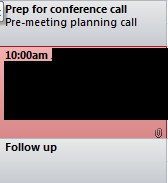
Time is scheduled before and after every meeting for prep, travel, and follow-up. This allows me time to walk into a meeting well prepared with documents gathered. It also ensures that I setup follow-up meetings, write a memo or email, etc., immediately after the meeting so that “balls are not dropped.”

clip_image007

When someone other than a parent or staff member stops by and asks “do you have a minute,” usually a salesperson, if I’m not in a meeting or leaving for one, I will give him or her a little time in order to give a good testimony of the gospel. However, if this is an unscheduled drop-in, I start by meeting him or her at the door. I remain standing. This significantly shortens the unplanned meeting. I will invite the unscheduled guest to sit IF I believe the issue has the potential to benefit the school and if I have time. Otherwise, the meeting will end as a standup meeting or my assistant will schedule a follow-up meeting. In other words, in so far as possible and polite, I attempt to control my time rather than having someone else control it.

I also use lunch for meetings. I have to eat anyway so I might as well make it productive. Very seldom do I eat without meeting with someone.

I normally leave the office at 4:00. I go home and run four miles on the treadmill while catching up on the news—I accomplish two things at once! I shower and eat and then go to any evening meetings or events that I may have.

I am almost always in bed by 10:00 and up at 5:00 the next morning.

Friday mornings are blocked on my calendar for project work—off campus to minimize interruptions. This is an important time each week. I am able to focus on those BIG rocks that can be crowded out by the urgent.

Phone Calls

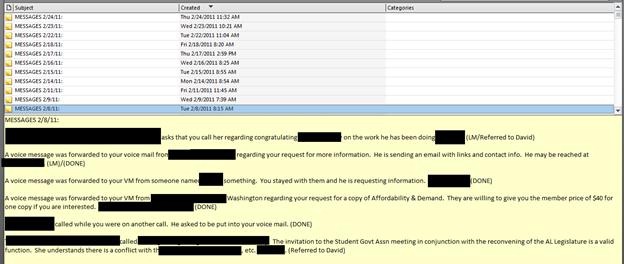
I have the blessing of having a wonderful administrative assistant. I have instructed her to log all phone calls into Outlook’s Notes function. This provides a permanent record of every call. After returning the calls I make quick notes on each log. This ensures that I return calls in a timely fashion and I have a record of my response—which can be as easy as “Returned, Left Message, Referred, etc.

clip_image009

I also return calls in the car using hands-free voice activated dialing. NEVER dial when driving. (That sentence will make my attorney happy!)

Managing Email and Information

email communication overwhelmed

clip_image010

Email management is a challenge—but not impossible! Rather than outline strategies for managing email in this article, I have created a PowerPoint Presentation that you may find useful. At the end of the presentation are links to short Microsoft training videos.

Click HERE to download the PowerPoint Presentation. You may share the PPT with whomever you wish; I only ask that you refer them to this blog.

Think Week

clip_image011

My Think Week is one of the most important practices that I have developed over the years. As I write this, I am preparing to leave for my Think Week. I will be reading 10 books and a stack of research documents—all on my iPad. For more information on Think Week see my previous post: How To Find Time to Focus, Think, and Work.

I got the idea for Think Week from articles I read about Bill Gates and his Think Week. Here are two articles that may interest you: Article 1: Bill Gates in Secret Hideaway, Article 2: Bill Gates Think Week.

Tools I Use

  • I strive to be as paperless as possible. To the extent that I have everything in digital form (which is almost everything) I can have my documents with me anytime and anywhere. They are also searchable and shareable. This is far more productive than keeping up with paper, legal pads, notebooks, post-it notes, etc.

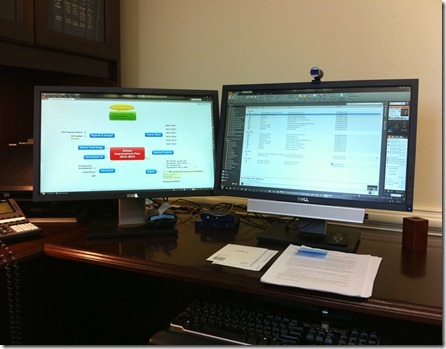
  • I use a Dell laptop on a docking station with two monitors. On the left is my project management/brainstorming software—Mindmanager from Mindjet. The center monitor is used for Outlook and other Microsoft products (Word, etc.)

clip_image012

  • I make extensive use of video-conferencing. I use ooVoo-think Skype on Steroids! Video-conferencing makes phone calls far more personal, there is less temptation to “multitask” while on a phone call, and you can share your desktop and/or files while on the call. Video-conferencing also reduces the number of emails I must process.

· I use the iPad for virtually all of my reading and note taking. There is a very effective and powerful note taking application called “Note Taker HD.” Used with a stylus it is as effective as a legal pad but with the advantage that all of your notes are in one location, searchable, and shareable.

Software I Most Frequently Use

  • Microsoft’s Office 2010

  • Docs-to-Go on my laptop and iPad. This program syncs all of my laptop documents to my iPad so that I have everything with me at all times. Docs-to-Go also enables me to read, create, and edit Microsoft documents-Word, Excel, and PowerPoint.

  • Mindmanager with a Catalyst subscription—for project management, brainstorming, and collaboration. The program tightly integrates with Outlook and Microsoft Office products making it an extremely effective task and project management tool.

  • The new I.E. 9 browser and Google's Chrome. They are fast, secure, full-featured, and customizable.

  • Note Taker HD—replaces a legal pad.

  • Logos Bible Study software—on my laptop and iPad. For in-depth Bible study.

  • Kindle software on the laptop, iPad, and iPhone—I carry my library in my pocket.

  • Skydrive—for online document storage, creation, and collaboration. Skydrive and MS Webapps integrate seamlessly with Microsoft Office.

  • ooVoo for video-conferencing.

  • Twitter—for keeping up with the news.

  • Jott—for leaving myself reminders when I’m in the car.

  • Adobe Acrobat Pro—for PDF creation and electronic forms completion and signing.

  • Loseit-see below.

Personal Health

clip_image014

Staying fit is critical to reducing stress and being efficient and effective. Although it gets tiresome, I count calories (I use a software program called LoseIt on my iPhone) and I track my exercise using the same program.

I run four miles a day six days a week (Sunday off) unless providentially hindered. I maintain my weight within the “ideal range,” for my height and age.

I do NOT like running and I do not like counting calories—but—doing so makes a big difference in how well I sleep at night and how much energy I have each day.

Because I do not like running, I do not sit down when I get home—not even for a minute!! I walk immediately to the closet and change into my exercise cloths and mount the treadmill.

Life is hectic and our jobs are demanding. Learning to thrive rather than merely survive as a leader is a challenge. It can be done. Attention to one’s spiritual and physical health, establishing good practices and habits, and making appropriate use of technology can all, when used in combination, reduce stress while we strive to accomplish more for God’s glory.

Should Teachers Text, Facebook, or Twitter Students?

Texting_Ariana_Cell_Phone_text

By Dr. Barrett Mosbacker

Do you think electronic communication between teachers and students should be forbidden or restricted? What are the benefits and risks of texting with students? How have you used texting and/or social networking as an educational tool.

What about Facebook?  Twitter?

Share your thoughts with the hundreds of educators who read this blog.

Fast Facts About Online Learning: I Do The Research So You Don't Have To

By Dr. Barrett Mosbacker

I have been reviewing a substantial body of research and attending national conferences as I formulate the theological, technological, financial, and marketing framework for a distance learning program at Briarwood Christian School.

I like to share the fruits of my labor with my readers.  Here is a summary of some of the research on distance learning that you may useful.

It has been said that “a picture is worth a thousand words.”  With that in mind, I am providing several charts that provide a useful snapshot of the status of distance learning in the U.S.

This is important information because as I noted in previous articles (They Are Coming After Your Students and Said So! and Can We Keep Up with the Competition?) it is imperative that we work through the theological and pedagogical implications of distance learning as we position our schools for the realities of a dramatically changing educational landscape.

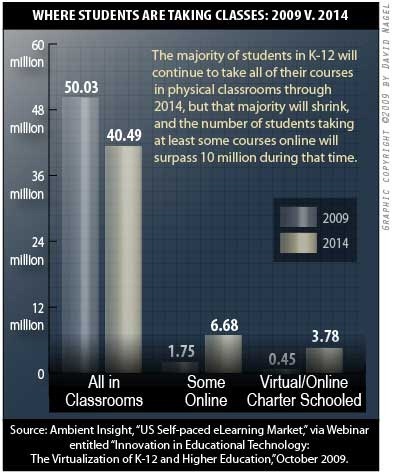
The Evergreen Education Group is the source (Evergreen Education Group. (2009). of Keeping Pace with K-12 Online Learning: An Annual Review of State-Level Policy and Practice. Evergreen, CO: Evergreen Education Group.) from which the graphics below are taken.

Growth of online learning charts

Where Students are Taking Online Classes

online education growth chart

Research, Trends and Statistics

K-12 Online Learning and Virtual Schools: Expanding Options

  • K-12 online learning is a new field consisting of an estimated $300 million market, which is growing at an estimated annual pace of 30% annually.

  • 45 of the 50 states, plus Washington D.C., have a state virtual school or online initiative, full-time online schools, or both.i

  • 24 states, as well as Washington, DC, have statewide full-time online schools.ii

  • Many virtual schools show annual growth rates between 20 and 45%.ii

  • 35 states have state virtual schools or state-led online programs. iii

  • As of January 2007, there were 173 virtual charter schools serving 92,235 students in 18 states.iv

  • 57% of public secondary schools in the U.S. provide access to students for online learning.v

  • 72% of school districts with distance education programs planned to expand online offerings in the coming year.vi

  • 14.2 million computers were available for classroom use in the nation’s schools as of the 2005-2006 school year. That works out to one computer for every four students.vii

Online learning in K-12 schools is growing explosively

  • There are an estimated 320,000 course enrollments in state virtual schools and 75,00 full-time students in full-time online schools in the U.S.ii

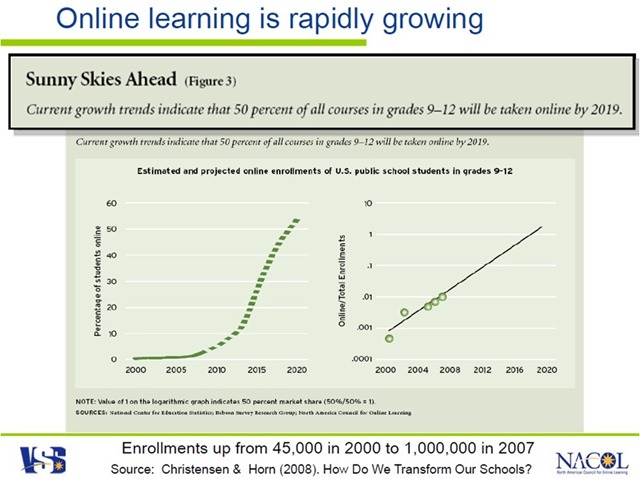
  • In 2000, there were 40,000-50,000 enrollments in K-12 online education.viii

  • Eduventures estimated 300,000 students participated in virtual learning in the 2002-2003 school year in the United States.ix

  • Alberta Online Consortium in Canada reported 4,766 enrollments in 2002-2003. In 2002-2003, NCES reported 328,000 distance education enrollments in K-12 public school districts.x

  • In 2008, Sloan Consortium reports that there are approximately 4 million college students are currently enrolled in fully online courses.xi

  • In 2006, the Sloan Consortium reported 700,000 enrollments in K-12 online learning. to read: According to the Sloan Consortium, the overall number of K-12 students engaged in online courses in 2007-2008, is estimated at 1,030,000. This represents a 47% increase since 2005-2006.xii

  • In 2006, Sloan Consortium reported there were 3.2 million postsecondary students in the United States that took at least one online course; this represents a 25% increase over the previous year.

  • In April 2006, Michigan became the 1 st state to require online learning for high school graduation. In 2008, Alabama added a high school graduation distance/online learning requirement ,as well. 80% of K-12 school districts cited “the course was otherwise unavailable” as the number one reason for offering courses at a distance. xiii

  • According to the 2009 Sloan Consortium report, K-12 school district administrators cited “offering courses not otherwise available at the school,” “meeting the needs of specific groups of students,” and “offering Advanced Placement or college-level courses” as the top three reasons they perceive online and blended courses to be important.xiv

  • Enrollment province-wide in British Columbia climbed from 17,000 students in 2006 to 33,000 students in 2007, according to Canada’s Ministry of Education statistics

  • When considering online education for students in rural communities who have either “access to only a limited number of course offerings in their public schools” or advanced students interested in taking courses for college credit, the public expresses considerable support. In these two instances, over 60 percent of respondents support public funding for online education.xv

Research Reports “As Good or Better”: Effective

According to NCREL Synthesis of New Research on K-12 Online Learning: xvi

  • Online Learning Expands Options: “The first impetus to the growth of K-12 distance education was an interest in expanding educational options and providing equal opportunities for all learners.” (p.7)

  • Online Learning Is Rapidly Growing: “Recent surveys show that K-12 online learning is a rapidly growing phenomenon.” (p.4)

  • Online Learning Is Effective: “Equal or Better”: “One conclusion seems clear: On average, students seem to perform equally well or better academically in online learning.” (p. 17)

  • Online Learning Training Improves Teaching: Teachers who teach online reported positive improvements in face-to-face, too. “Of those who reported teaching face-to-face while teaching online or subsequently, three in four reported a positive impact on their face-to-face teaching.” (p. 25)

Today’s Students

  • The Pew Internet Project reports “the Internet is an important element in the overall educational experience of many teenagers”:xvii

  • 87% of all youth between the ages of 12 and 17 use the Internet (21 million people).

  • 86% percent of teens, 88% of online teens, and 80% of all parents believe that the Internet helps teenagers to do better in school.

  • 85% of 17 year olds have gone online to get information about a college, university, or other school they were thinking about attending.

High School Reform and Redesign

  • Data suggest that in about six years 10 percent of all courses will be computer-based, and by 2019 about 50 percent of courses will be delivered online.xxi

  • 90% of the fastest growing jobs in the economy require a college degree.xxii

  • Over 40% of our nation’s high schools do not offer any AP courses. Many of these schools serve predominantly low-income and minority students.xxii

  • Virtual schools and online programs provide AP courses.

  • While only 44% of U.S. high school students studied a foreign language in 2002, learning a second or third foreign language is compulsory for students in the European Union and elsewhere.xxii

  • Virtual schools offer foreign language courses online that allow interactive communication and collaboration with students and teachers across state and national boundaries for 21st century learning.

  • 52% of middle school and 15% of high school mathematics teachers did not have a major or minor in mathematics and 40% of middle school and 11% of high school science teachers did not have a major or minor in science.xxiii

  • Virtual schools and online programs provide a range of courses such as science, math, foreign languages, electives and remedial courses with highly qualified teachers.

  • According to the Manhattan Institute, 70% of all students in public high schools graduate, and only 32% of all students leave high school qualified to attend four-year colleges.xiv

  • The high school graduation rate in the United States is 70%. High school drop-out rates in urban areas average 50%.xxv

  • Only 51% of all black students and 52% of all Hispanic students graduate, and only 20% of all black students and 16% of all Hispanic students leave high school college-ready.

  • According to recent research from the Silent Epidemic study, 47% said a major reason for dropping out was that “classes were not interesting” and they were “bored”; 88% of drop outs had passing grades.xxvi

  • The National Education Technology Plan recommended that every student have access to e-learning opportunities and every teacher have access to e-learning training.xxvii

  • Virtual schools and online learning can help provide equal access to rigorous courses for all students, reducing inequities that exist across the educational system.

  • Today 6,000 talented young people will drop out of school. xxvii

  • Today only 11 states require credits in a foreign language for students to graduate.xxvii

  • Today two-thirds of high school students will be bored in at least one class.xxvi

  • Today African American students are 14 percent of those in school, but only 7 percent of those taking Advanced Placement exams.xxvii

  • Today 15 million students who need mentors do not have them. Xxviii

  • 69 percent of the public say that they “would be willing to have a child [of theirs] go through high school taking some academic courses over the Internet.xxix

References

iNACOL. (2009). Fast facts about online learning. Washington DC: International Association for K-12 Online Learning (iNACOL).

i Keeping Pace with K-12 Online Learning 2009, Evergreen Consulting; www.KPK12.com

ii Keeping Pace with K-12 Online Learning 2009, Evergreen Consulting; www.KPK12.com

iii Keeping Pace with K-12 Online Learning 2009, Evergreen Consulting; www.KPK12.com

iv Center for Education Reform. (Note: There are 173 virtual charter schools with 92,235 students, up from 147 schools serving 65,354 students in 18 states in 2005-2006; 86 such schools with 31,000 students in 13 states in 2004-05; 60 schools in 13 states in 2002-03).

v Internet Access in U.S. Public Schools and Classrooms: 1994–2005, 2007. U.S. Department of Education. Washington, DC: National Center for Education Statistics. www.nces.gov.

vi Distance Education in Elementary and Secondary Public School Districts, 2005, U.S. Department of Education National Center for Educational Statistics. www.nces.ed.gov

vii Upcoming Statistical Abstract of the United States: 2009, Table 252 http://www.census.gov/compendia/statab/

viii Virtual Schools, 2001, Tom Clark/WestEd.

ix In 2002-2003, 4,766 students in Alberta, Canada were enrolled in online learning programs; up 1,000 from the previous year’s 3,810 students.

x Distance Education in Elementary and Secondary Public School Districts, 2005, U.S. Department of Education National Center for Educational Statistics. www.nces.ed.gov.

xi Staying the Course: Online Education in the United States, The Sloan Consortium, 2008. http://www.sloanc.org/publications/survey/pdf/staying_the_course.pdf

xii K–12 Online Learning: A 2008 Follow-up of the Survey of U.S. School District Administrators, Sloan Consortium, January 2009, http://www.sloan-c.org/publications/survey/pdf/k-12_online_learning_2008.pdf.

xiii Distance Education in Elementary and Secondary Public School Districts, 2005, U.S. Department of Education National Center for Educational Statistics. www.nces.ed.gov.

xiv K–12 Online Learning: A 2008 Follow-up of the Survey of U.S. School District Administrators, Sloan Consortium, January 2009, http://www.sloan-c.org/publications/survey/pdf/k-12_online_learning_2008.pdf.

xv “The 2008 Education Next-PEPG Survey of Public Opinion,” Fall 2008, (vol. 8, no. 4), http://www.hoover.org/publications/ednext/26380034.html.

xvi NCREL Synthesis of New Research on K-12 Online Learning, 2005, North Central Regional Education Laboratory/Learning Point Associates. www.ncrel.org/tech/synthesis/.

xvii The Internet at School, 2005, Pew Internet Study. www.pewinternet.org.

xviii Rates of Computer and Internet Use by Children in Nursery School and Students in Kindergarten Through Twelfth Grade, 2003, National Center for Educational Statistics, U.S. Department of Education. http://nces.ed.gov/programs/quarterly/vol_7/1_2/4_4.asp.

xix Internet Access in U.S. Public Schools and Classrooms: 1994–2005, 2007. U.S. Department of Education. Washington, DC: National Center for Education Statistics. www.nces.gov.

xx Internet Access in U.S. Public Schools and Classrooms: 1994–2005, 2007. U.S. Department of Education. Washington, DC: National Center for Education Statistics. www.nces.gov.

xxi How Do We Transform Our Schools?, Education Next, Christensen, Clayton M. and Michael B. Horn, Summer 2008 (vol. 8, no. 3), http://www.hoover.org/publications/ednext/18575969.html.

xxii Expanding the Advanced Placement Incentive Program, U.S. Department of Education. http://www.ed.gov/about/inits/ed/competitiveness/expanding-apip.html.

xxiii Schools and Staffing Survey: 1999-2000, U.S. Department of Education. www.ed.gov.

xxiv Public High School Graduation and College Readiness Rates in the United States, 2003, from the Manhattan Institute. www.manhattan-institute.org.

xxv Public High School Graduation and College Readiness Rates in the United States, 2003, from the Manhattan Institute. www.manhattan-institute.org.

xxvi The Silent Epidemic: Perspectives on High School Dropouts, 2006, Bill and Melinda Gates Foundation. www.gatesfoundation.org.

xxvii Toward A New Golden Age In American Education: How the Internet, the Law and Today’s Students Are Revolutionizing Expectations: National Education Technology Plan, 2005, U.S. Department of Education Office of Educational Technology.

xxviii The Association for Supervision and Curriculum Development: The Whole Child. www.wholechildeducation.org.

xxix “The 2008 Education Next-PEPG Survey of Public Opinion,” Fall 2008, (vol. 8, no. 4), http://www.hoover.org/publications/.

How and Why to Create a Word Cloud to Get Your Message Across

By Dr. Barrett Mosbacker

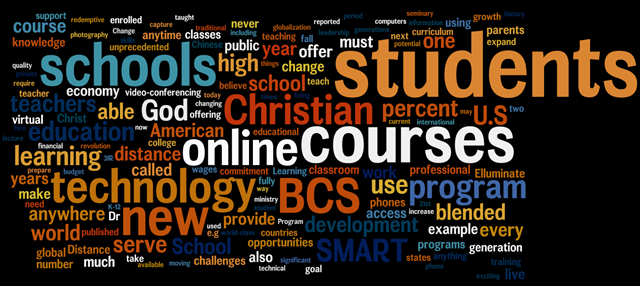
I may be way behind but I just recently discovered that I could create a word cloud to present a visual representation of written material.  Having just written an important memo to my staff on our new distance learning initiative, I decided to create a word cloud using the text of my memo.  Below is the result.

image

The size of a word in the visualization is proportional to the number of times the word appears in my memo.  What is interesting, and encouraging, is that “Student” is the most prominent word, reflecting the focus on the benefits to students of our new distance learning initiative.  

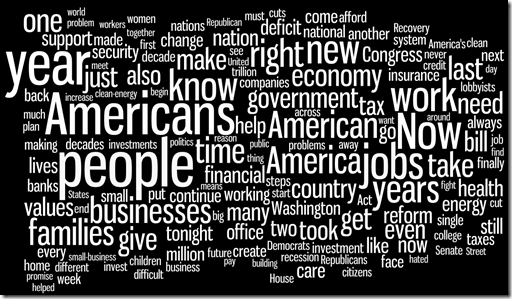
I used Wordle to create my word cloud.  Wordle has a public gallery of word clouds.  Here is one I created from President Obama’s State of the Union speech.

image

Here is a word cloud I created from President George Washington’s first Stat of the Union speech.

image

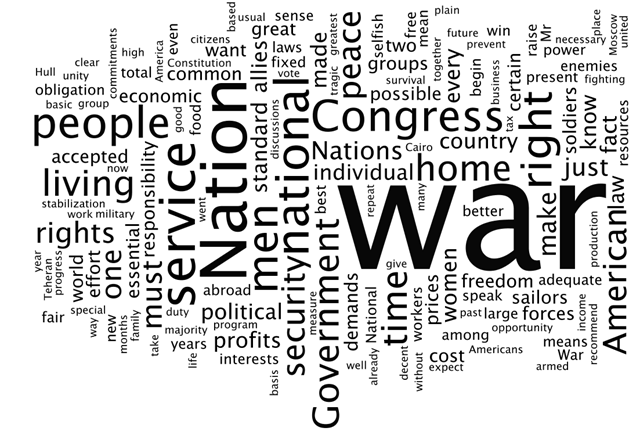
Finally, here is a word cloud I created from President Franklin Roosevelt's 1944 State of the Union speech.

image

Beyond being merely fun and interesting, which it is, it also has real educational value.  For example, as illustrated above, a history teacher could use word clouds to compare historical documents as a way of illustrating the primary focus of concern.  A literature teacher could compare two pieces of literature dealing with similar themes.  Or, you could analyze your presentations to determine if the word frequency matches your intended emphasis.  Obviously, frequency is but one indicator, but useful.

image

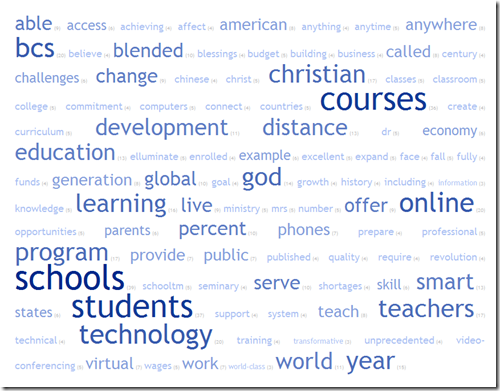
Whereas Wordle provides the flexibility to change the layout, font, color, etc., of your cloud, tagcrowd provides more options in handling the actual text, e.g., the number of words displayed, word grouping (similar words), etc.  This can be useful because you can group words that should be combined to better illustrate frequency, e.g., learned, learns, learning=learning.  The word cloud below was created from my distance learning memo using tagcrowd.

Helpful Tips

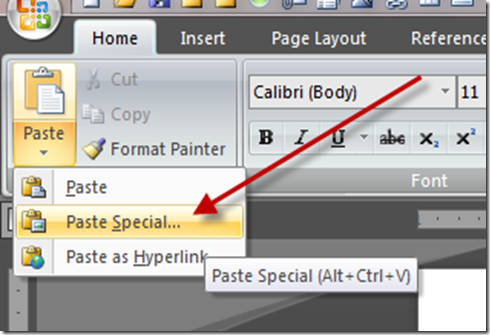
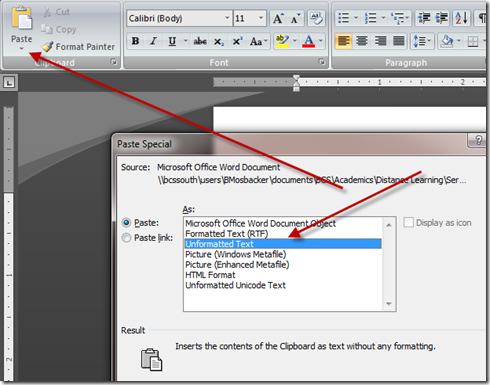
It is best to paste your text in the Wordle or Tagcrowd textbox in unformatted text format without paragraph marks, bullet points, etc.  The easiest way to do this in MS Word is to copy your text and then paste in in a new Word document as unformatted text.

image

image

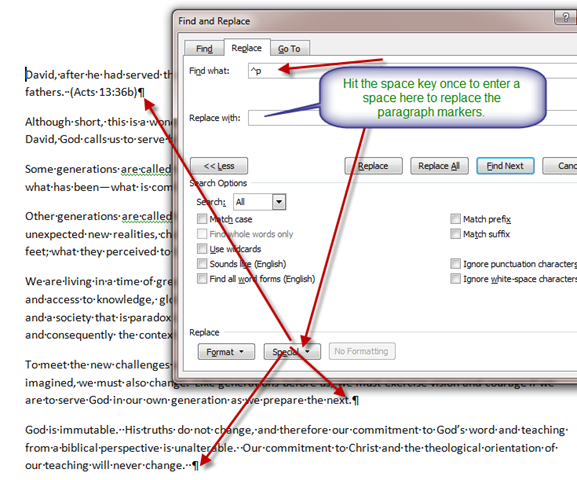
Then,  using the Fine/Replace tool in Word, replace paragraph marks, etc, with a space.

image

Copy and paste the resulting text in Wordle or Tagcrowd to create your new word cloud.

Goodbye to Discs and Pages?

By Dr. Barrett Mosbacker

This article, although related specifically to Apple and Amazon, the larger story is the fast movement to digital content for books/textbooks. 

Amazon vs. Apple: Battle of the books

With its new iPad, Apple is taking aim at Amazon's core business and its Kindle book reader. Can the 'e-tail' pioneer keep up as books, music and movies go all-download?

By Michael Brush

Amazon.com (AMZN, news, msgs) has come out on top in the digital revolution that's moving sales of books -- as well as compact discs, DVDs and lots of other products -- online.

But there's a second digital uprising afoot, and some experts think Amazon won't fare as well -- and could lose a sizable chunk of its core bookselling business.

Any Amazon losses would likely be gains for Apple (AAPL, news, msgs), which could do to its "e-tail" rival what Amazon has been doing to brick-and-mortar competitors.Apple's chief weapon in this battle of online giants -- the iPad -- will be rolled out April 3, with preorders starting March 12. Among the many things people will be able to do with these flat touch-screen computers: download and read digital books from Apple's new iBookstore.

Amazon has its own successful book reader, the Kindle. But Apple dominates in music downloads, so there's good reason to think it will take a big share of the market for downloadable books. "In music, Apple is the dominant player. Now Apple wants to do the same in books," says Jeffrey Liebenson an attorney with Herrick, Feinstein who was involved in some of the early music industry negotiations with Apple. And the iPad threat is part of a bigger-picture "digital transition" risk to Amazon that has led many investors to head for the exits.

The worry? Books are joining music in a broad shift to entertainment via digital download, and that's a game Apple tends to win.

Goodbye discs and pages

Think how this second digital revolution has changed the way we get entertainment:

  • When was the last time you bought a CD? Sales of CDs declined to 301 million last year from 712 million in their peak year of 2001, according to Nielsen SoundScan. Instead, people download music -- and Apple, with its iTunes store, dominates with a 70% market share. Amazon has 8% of the music sales market.

  • The same thing is happening to DVD sales. Video stores such as Blockbuster (BBI, news, msgs) are already hurting. Consumers will soon wonder why they should buy a DVD anywhere when they can get a movie online -- instantly.

E-Book price wars

Amazon hasn't ignored these changes. You can download music at the online retailer -- and from many other places, of course -- but Apple simply rules this game.

You can also get movies over the Internet from Amazon. Here Apple isn't dominant, but the field is crowded with strong rivals: cable companies, Netflix (NFLX, news, msgs), Hulu and Vudu, which was recently purchased by Wal-Mart Stores (WMT, news, msgs).

Books are next, and Amazon is certainly a major player in the digital book market with the Kindle. But imagine that Apple does to the book market what it's done in music. How much will be left for Amazon or anyone else?

The risk to Amazon's business is real, and it is one of the main reasons Credit Suisse analyst Spencer Wang is telling investors to avoid buying Amazon stock now. He has a "hold" rating on the online retailer and a 12-month price target of $130 a share, around where the stock sells today.

Because of these worries, investors sold out of Amazon stock earlier this year when it became clear Apple was entering the e-book market, analysts say. The stock is down from a 52-week-high at $146, though, like the market as a whole, it's way up from its lows.

Among those selling has been Amazon founder and CEO Jeff Bezos. In February, he sold 2 million shares of Amazon stock at prices between $116 and $120, according to Thomson Reuters. He sold 7 million shares in 2008-09, after selling no stock at all during 2005-07.

The strong side of Amazon

Mind you, this is a battle of giants.

Amazon's stock is up 50% since I wrote in August 2008 about a different battle for online sales ("How Amazon is beating up eBay"). The Standard & Poor's 500 Index ($INX) is down more than 10% from where it was then, and eBay (EBAY, news, msgs) is down slightly.

Amazon revenue grew an impressive 37% in the fourth quarter of 2009. It owns 22% of the North American book market, according to a Credit Suisse estimate. And it can continue to grow by doing what it does best: taking market share from brick-and-mortar retailers.

It sold an estimated 2 million Kindle book readers last year, and 3.1 million are expected to be sold this year, according to estimates by Barclays Capital analyst Douglas Anmuth. Amazon's stated goal of having every book ever printed in any language available on Kindle in less than 60 seconds is a bold one -- and however realistic, it means Kindle owners should eventually be able to get virtually any book they want.

The Apple advantages

Apple, though, is a fierce competitor, which is what makes the battle intriguing. And it has two big advantages as it goes after book sales.

Advantage No. 1: Apple has eager allies in the publishers.

To promote Kindle, Amazon has been offering great deals on new and best-selling e-books, a 55% discount off a typical $22 list price to $9.99. It's selling many e-books at a loss, says Wang, the Credit Suisse analyst.

This annoys publishers. They think Amazon has too much clout in the book business, and they don't want to see that extended to e-books. And they worry that a $10 price will "cheapen" books, training consumers to always expect low prices.

Enter Apple. It has offered publishers better prices than Amazon asks -- as long as the publishers make other vendors (i.e., Amazon) raise the retail price on best-selling e-books to $12.99 to $14.99. Most of the major publishers have signed on. If the alliance sticks, it will hurt Amazon's strategy for taking market share and fueling Kindle growth.

"All the publishers I talk with are hoping the iPad will live up to the hope," says Todd Eckler, the vice president for print and publishing at North Plains, which sells software to help providers put their content online.

Advantage No. 2: Apple is better than almost anyone at making gadgets.

This is key, because the gadgets can be crucial in determining which company eventually controls the content ecosystem, including the all-important formats that can be used to lock out competitors.

One of the main reasons Apple dominates music is the popularity of its iPod players and its music-playing iPhone. Lots of companies make music players, but Apple dominates so thoroughly that "iPod" is nearly a generic term.

Though we won't know for sure until it hits the market, with its smooth interface and bright color screen, the iPad seems sure to be a comfortable way to read books, believes Scott Testa, a professor of business administration at Cabrini College in the Philadelphia area and an avid Kindle user. "The iPad is going to blow the Kindle away as far as ease of use and the quality of the screen," he says.

Amazon's gadget will have the price advantage. The Kindle starts at $250 and is likely to get cheaper soon. Apple's iPad will start at $500; if Apple wins, it will likely be because the iPad does much more.

Though the iPad's features and processing power will be overkill for the simple act of reading a book, they're likely to contribute to an evolution in what constitutes a book that could move that market toward Apple.

A next-generation iPad book could easily include video on "the making of the book" as with DVDs, an author interview or music -- features that will make book reading a richer experience, says Eckler, of North Plains, which sells software that helps publishers do these things.

Beyond books, consider that the many potential customers who already have deep libraries of iTunes music and video can play those on their iPad. They don't work on a Kindle or on other manufacturer's devices. If customers buy only one device, that's an incentive to go with the iPad.

The Google wild card

Amazon also has Google (GOOG, news, msgs) to worry about. The latter is scanning as many books as possible to build up the world's biggest digital book database.

We're still not sure how Google plans to make money off this, but one approach is obvious: Google will likely discount books (or give away books in the public domain, without copyright limits, for free), and make up the difference by charging sponsors for ad words, just as it does for search. Plus industry experts believe that like Amazon and Apple, Google will roll out its own book reader at some point soon.

So what to do with Amazon?

Against this backdrop, what does Amazon's future hold?  

An Amazon spokesman declined to comment for this column. But in a recent conference call with investors, when asked about the emerging book battles, Amazon finance chief Thomas Szkutak responded: "We think we are positioned very nicely from a digital perspective. We think we are focused on the customer, and I think Kindle is certainly a good example of that."

Even without the price advantage, the Kindle would be good enough for many book fans, particularly older readers who will be happy to read books and newspapers on the Kindle's black-and-white screen. "It is a generational thing," says Eckler. "The Kindle is simple. There are not a lot of buttons."

Wang, of Credit Suisse, believes Amazon will continue to see 7.5% annual growth in North American book sales over the next five years, even with Apple entering the market.

There's also a macroeconomic reason Amazon will be OK: Online sales still represent only 3.8% of overall retail sales in the U.S. So there is still plenty of room for Amazon, the leader in the space, to grow as more retail moves online, says Mark Mahaney of Citigroup.

The key takeaway for investors is this: Don't buy Amazon stock expecting the kind of huge gains seen over the past couple of years. Many market players will wait to see how the online retailer manages the all-digital transition, but with savvy competitors such as Apple attacking its core book market, growth will slow.

Apple's stock, on the other hand, just keeps rising. You would be buying today at an all-time high, which can be risky. But citing the iPad, plus continued strength in iPhone and Mac sales, Credit Suisse analyst Bill Shope has an outperform rating and a 12-month price target of $275 on Apple stock, from about $223 today.

For consumers, the book battle could mean higher prices on new and best-selling e-books, as Apple aligns with publishers to raise prices above Amazon's big discounts. But gadget prices should fall quickly as the competition heats up.

And the cool news is that the iPad may open up a whole new world of "words" that brings lots of cool features to the concept of a book. Amazon and others will have to match technologies or lose out. The simple act of reading is changing forever.

At the time of publication, Michael Brush did not own or control shares of any company mentioned in this column.

Asking Important Questions About Technology

By: Mitchell Salerno, High School Principal and Arlene Outerbridge, Director of Guidance (The Master's Academy)

A recent editorial in The Philadelphia Inquirer (Click here to view article) raised questions about “one-to-one computing” initiatives sprouting up in schools around the country. Zimmerman (2010) argues that this technology has the potential to drive students further away from human interaction and that there is little evidence that one-to-one initiatives actually increase student learning. Zimmerman further suggests that qualified and talented teachers, rather than the latest technology, will improve learning. Humorously, Zimmerman quotes Thomas Edison (in 1922), “I believe the motion picture is destined to revolutionize our educational system and that in a few years it will supplant largely, if not entirely, the use of textbooks.”

If you listen carefully, you will hear similar language among today’s educational reformers. Simply replace “motion picture” with “Kindle” or “iTouch” or “laptop.” Are these tools going to revolutionize education and replace textbooks?

I am a technology fan and have pushed technological initiatives at every opportunity. Our students need to understand how to live in a 21st century world and our schools are largely responsible for providing opportunities for students to interact with the abundance of technological tools available to them. However, our schools must continue to ask the hard questions such as:

· How do we see technology as a positive for our students?

· How do we see technology as a hindrance to our students?

· If we add (insert technology), how do we ensure that the positive benefits to our students outweigh the negative?

Zimmerman (2010) also raises a secondary question regarding the parent’s ability to aid the students as they navigate the new world of technology. Our students are growing up in a fundamentally different world than we grew up in. As an example, I was at the barbershop today and my barber and I were discussing the latest video games. We had seen an ad on the television and couldn’t tell if it was for a movie or a video game. It is amazing to think that technology has advanced to this point. So as all old-timers do (I am 34!), we began to tell stories of how things used to be.

As I reflect on that conversation, I am amazed at the fundamental difference between our world in the 1980s and the world today. Yet, I am also amazed at how the human condition has not changed. Christian schools, and education in general, really has not changed. We are still asking the same questions about what students need to learn, how they should learn, etc. While our ability to do stuff has increased exponentially, our “condition” has not changed at all.

It is possible that our students’ parents do not know how to deal with the rapidly changing technological landscape. Our efforts to train the children are often the easiest task we have. Zimmerman (2010) shares, possibly inadvertently, his struggles as a parent in this new technological world. Our parents might be struggling as well. Our schools need to be mindful of the “old-timer’s” struggle with encroaching technology and begin to ask questions such as:

· If we add (insert technology), how do we combat parent fears?

· How do we help parents understand the purpose and benefit of this technology?

· Have we considered the impact this technology will have on the home?

In the end, technology is merely a tool. It certainly may be leveraged for the Kingdom, but we must begin to teach our students how to properly value and utilize technology, beginning with our own actions. As we devise new ways to implement technology, let’s make sure that we are taking care to keep Christ first and refuse to allow education to be about tools rather than children.

References

Zimmerman, J. (2010, March 2). Should schools be giving out computers?. The

Philadelphia Inquirer. Retrieved from

http://www.philly.com/inquirer/opinion/85934327.html

Why and How to Use Twitter

By Dr. Barrett Mosbacker

Why should you use Twitter?

That was my first reaction when I was first exposed to Twitter.  Frankly, I had my doubts.  However, as I have gained more experience with Twitter I have discovered that it can be a very useful and powerful tool—the trick is to use it properly to meet your needs.  If it is not used wisely it will merely produce “noise” in your life.

In the Complete Guide to Twitter, the author list the following benefits of using Twitter:

  • Being able to “live-Tweet” an event. Twitter’s “moment” when it went from banality to mainstream was at the 2007 SXSW conference when attendees were rapidly twittering conference developments as they happened. People could then stand in front of two large screens and watch the Twitter timelines rapidly and constantly updating with what was happening next. Call it instant messaging on steroids.

  • Being able to break the news live from where it happens. The best example of this is, of course, Iran when the public went onto the streets in protest of the 2009 national elections. Iranian tweeters were able to bypass official government restrictions and tweet everything that was going on in their country. It got to the point where “official” news agencies such as CNN and the BBC were forced to get their news from Twitter because their own journalists had been expelled from the country. These messages were then presented on the television screen to the viewers. Twitter messages also give the news a “human face” because they are coming directly from the people most affected by the events in question.

  • Being used by friends & family to "follow" each other: are your family and friends in another country from you? Do you have trouble keeping in touch with friends, either real or cyber? Then Twitter makes an excellent tool for keeping in touch and finding out what your family and friends are up to and what they are thinking at that particular moment.

  • Real Time Event Search Engine: because of the continuous buzz, Twitter can be considered a rapidly updating search engine, powered by real people. It can be easily used to check what people are saying about currently unfolding events, or to check up on more personal, time-related issues (e.g. if Gmail is down for everyone or just you). We will get more into detail on this later in the manual.

  • Being able to promote your blog posts: If you use a website called Twitterfeed6, you can have all your blog posts automatically posted to a Twitter feed as they are published. This has proven to be a highly effective way of promoting a blog or website. Readers who live on Twitter instead of an RSS feed can be notified of your new material in their timeline.

  • Job networking: in this current economic climate, an unemployed person needs all the edge they can get and Twitter hasn’t been left out of their job seeking armoury. The site is now being used to ask for work and to look for suitably qualified candidates. Both job seekers and job providers are leaving messages on Twitter with what they need. Private messaging takes care of the rest. ). These tweets can then be retweeted to others and discussed by those who may decide to subscribe to your site later.

  • Being able to get the resources you need: Twitter has also been used if a user needs something or has something to offer. Need someone to car-share on a trip from San Francisco to New York? Do you have a spare conference room which you can loan out to someone? Are you selling something or looking to buy something? Then Twitter can be used as your interactive classified ads column. No more placing ads in the newspaper.

For excellent tips,tricks, and powerful resources for using Twitter, download the The Complete Guide to Using Twitter